# Cline
## Install
Install [Cline](https://docs.cline.bot/getting-started/installing-cline) in your IDE.
## Usage with Ollama
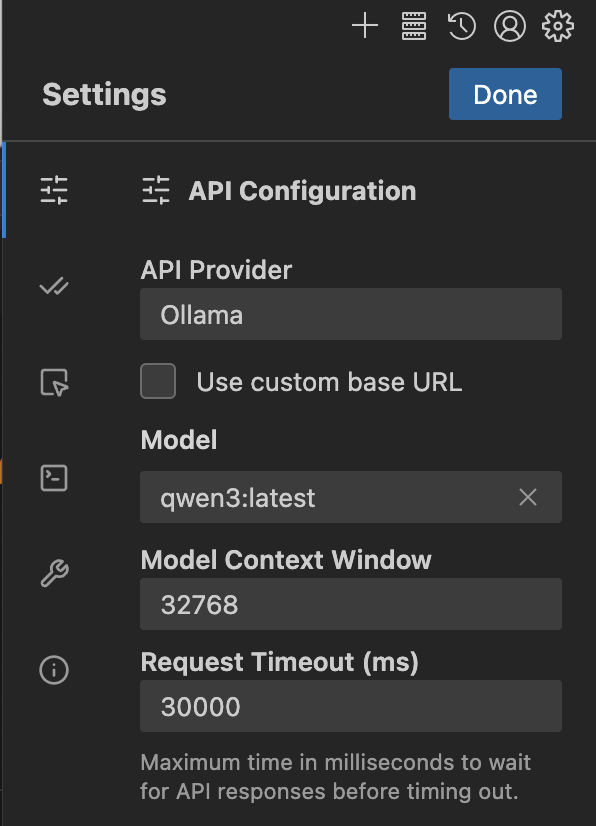
1. Open Cline settings > `API Configuration` and set `API Provider` to `Ollama`
2. Select a model under `Model` or type one (e.g. `qwen3`)
3. Update the context window to at least 32K tokens under `Context Window`
Coding tools require a larger context window. It is recommended to use a context window of at least 32K tokens. See [Context length](/context-length) for more information.
## Connecting to ollama.com
1. Create an [API key](https://ollama.com/settings/keys) from ollama.com
2. Click on `Use custom base URL` and set it to `https://ollama.com`
3. Enter your **Ollama API Key**
4. Select a model from the list
### Recommended Models
* `qwen3-coder:480b`
* `deepseek-v3.1:671b`
---
> To find navigation and other pages in this documentation, fetch the llms.txt file at: https://docs.ollama.com/llms.txt